
Device Code Phishing: the Microsoft 365 scam that does not need a fake login page

Executive Summary
Device code phishing is a newer type of Microsoft 365 attack that uses a real Microsoft login process against the user. Instead of stealing a password on a fake website, the attacker tricks someone into entering a code on Microsoft’s genuine device login page, which can give the attacker access tokens to the account. That makes it harder to spot, harder to stop with basic user awareness alone, and a growing concern for businesses using Microsoft 365.
Device Code Phishing
Most people think phishing means a fake login page, a suspicious link, or an email full of spelling mistakes. Device code phishing is different.
It abuses a legitimate Microsoft sign-in method designed for devices like printers, smart TVs, and other kit that cannot easily display a full login screen. In a normal scenario, the user is shown a short code, visits Microsoft’s device login page on another device, signs in, and authorises access. In a phishing scenario, the attacker starts that process themselves and then tricks the victim into entering the code for them.

That is why this attack can be so convincing. The Microsoft page is real. The sign-in journey can look normal. Even multi-factor authentication may not save the day, because the victim is authorising the attacker’s session rather than having their password “stolen” in the traditional sense.
This is not just a theoretical risk. Microsoft disclosed an active device code phishing campaign by Storm-2372 in February 2025, and newer research from Microsoft and Huntress in 2026 shows the technique being used at greater scale with more automation, more convincing lures, and faster post-compromise activity. Proofpoint has also reported multiple threat clusters using device code authorisation to gain access to Microsoft 365 accounts.
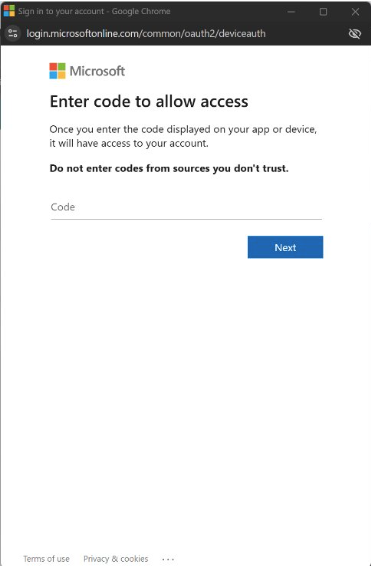
For SMEs, the takeaway is simple. If a member of staff is unexpectedly asked to enter a code into Microsoft’s device login page, especially from an email, Teams message, text, or document-sharing prompt, that should raise concern. Most office users never need to do this as part of their normal workday.
The technical fix is just as important as user awareness. Microsoft now provides Conditional Access controls that can explicitly restrict or block device code flow, and its guidance is to block it wherever possible unless there is a clear, documented business need. For many businesses, that makes this a good opportunity to review sign-in policies, legacy device use, and whether unusual authentication flows are being monitored properly.
At Get Support, this is exactly the kind of threat we help clients reduce. The answer is not just better phishing awareness training. It is a mix of secure Microsoft 365 configuration, Conditional Access, identity monitoring, and a clear plan for spotting suspicious sign-in activity before it turns into account compromise.
FAQs
It is a phishing technique that abuses Microsoft’s device code login flow. The attacker gets the victim to enter a code on a real Microsoft page, which can authorise access to the victim’s account.
Because the sign-in page is genuine. The victim may not see a fake website, which removes one of the warning signs people are usually taught to look for.
Not always. In this type of attack, the victim may complete the full legitimate login and MFA process themselves, but for the attacker’s session.
If it is not needed, Microsoft recommends getting as close as possible to blocking it. A review should be done first to make sure no legitimate business systems rely on it.
Any Microsoft 365 organisation can be targeted, but campaigns described by Microsoft, Proofpoint, and Huntress show particular value in compromising business accounts for email access, persistence, and data theft.