

Executive summary
- In this edition of Microsoft 365 Copilot Release Roundup, we focus on four of the biggest additions to Microsoft’s AI tool in the second half of 2025.
- The introduction of Agent Mode in Word and Excel, as well as specialised agents like the Researcher and Analyst mean you can finally start offloading some of the grunt work to AI.
- If you have a 365 Copilot license, you’re already paying for these upgrades – so it’s high time to move beyond basic email summaries and start getting some serious value for money from AI.
Introduction
Since it was made available in November 2023, Microsoft 365 Copilot (like all things AI) has evolved fast.
We’ve been covering as many of the big ones as we can here on the Get Support blog, but we haven’t checked in for a while, so we thought we’d compile a list of the biggest and best updates for the second half of 2025.
You’re paying a premium for these licenses, but if your staff are still using Copilot the same way they were in January – just asking it to write funny emails – you’re not making the most of the investment.
So, to save you wading through a hundred pages of release notes, we’ve curated the top updates (in no particular order) from H2 2025 that you need to know about right now.
1. A new Microsoft 365 Copilot Search experience
We’ve all been there. You know you talked about the “budget forecast” last week, but was it in an email, a Teams chat, or a random Word doc?
The new Microsoft 365 Copilot Search solves this. It replaces the classic search bar with a semantic, AI-powered engine. So, instead of just looking for keywords, it looks for meaning. You can search for “last week’s design review” and it actually knows which meeting you’re talking about.
Even better, they’ve added AI Views. That means that, when you hover over a result, you don’t just see a link to the file – you get a summary card with a generated summary and any related content. It helps you jump from “I vaguely remember a meeting” to having all the critical details at your fingertips in seconds.
Assuming you have the license, you can try the new Copilot Search experience here: https://m365.cloud.microsoft/search
2. The Researcher and Analyst agents
Just as we headed into the second half of the year in June, Microsoft rolled out two specialised “reasoning agents” that move beyond general chit-chat. What does “reasoning” mean here? Essentially, that the AI will check its workings. It takes longer to respond, but this multi-step reasoning means it should follow instructions and provide much richer responses.
These two new agents are similar to the sales, service, and finance agents that we covered in October. They’re distinct personas designed to do specific jobs that used to take hours.
- The Researcher: This agent is designed to plan, execute, and create reports. Unlike the standard Copilot Chat, it can perform multi-step research over both the web and your internal work data. It identifies credible sources, organises the information, and produces a structured, cited report. It’s perfect for preparing briefing docs before a big client pitch.
- The Analyst: Working primarily within Excel, this agent goes deeper than just writing formulas. It can identify anomalies in your data, spot errors, and highlight key insights automatically.
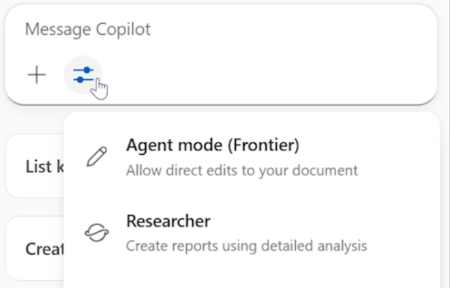
While general Copilot Chat is a jack-of-all-trades, these two are the experts you call in for the heavy lifting stuff. To try out either of these agents, head to https://m365.cloud.microsoft/chat and find them in the ‘Agents’ list in the left-hand menu. You can also use Analyst directly in Excel by clicking the Copilot button in the ribbon, then selecting the “Tools” icon within the text box and clicking “Analyst”.
3. A longer memory and unified Copilot Chat for Microsoft apps
A common complaint in early 2025 was that Copilot had something of a “goldfish memory.” If you fed it a 50-page contract, it sometimes forgot page 2 by the time it got to page 49.
That issue is now solved with the new long-context model, which rolled out in September.
Copilot Chat can now process over one million tokens within its context window. In plain English, a context window is like your short-term memory. So this change means Copilot can hold a massive amount of information in its working memory at once – roughly the equivalent of a thick novel. Even the chattiest of users will have a hard time hitting those limits.
Microsoft also finally finished unifying the chat experience across Word, Excel, PowerPoint, and Outlook. It’s now context-aware everywhere. That means that it can “see” whatever it is you’re seeing within that app, whether it be a PowerPoint deck, Word document, or Excel spreadsheet. Just click the Copilot button in any of these apps and it’ll understand the context of whatever you have open.
4. Agent Mode in Word and Excel
In October, Microsoft introduced “Agent Mode” in both Word and Excel.
At the moment, Agent Mode is part of the Microsoft Frontier program, but it should be rolling out soon for all Copilot licensed users. You’ll know if you have access because the mode will appear as an option in your Tools menu in the Copilot text box.
So, what does it do? Until now, Copilot has been conversational: you give it a prompt, and it gives you a response. Agent Mode changes this dynamic to a more collaborative back-and-forth. In short, it can (finally) make changes to a file for you:
- In Word: You define a goal, like “summarise customer feedback trends”, and the Agent actually creates the document for you in the main Word window – not just as a response in the chat. It drafts, asks clarifying questions, and refines the document using the same Word tools you use.
- In Excel: For number-crunching, the agent plans multi-step data tasks. If you ask it to model a forecast, it will build the tables, reshape the data, and create charts right in the grid, showing you its working as it goes.
Are you using what you’re paying for?
These features are live (or are rolling out) in your tenant right now. They aren’t paid add-ons or optional extras – they’re a core offering of your Microsoft 365 Copilot license.
If reading this list made you realise that your team is still just using Copilot to summarise emails, it might be time to look at some training. The tool is evolving fast, so your business processes need to evolve with it.
If you need help configuring these new agents – or just want to know how to access any of these new tools – speak to your Get Support Customer Success Manager or call our friendly team on 01865 594 000.